CBAM Quarterly Reporting: A Practical Guide for EU Importers

CBAM Quarterly Reporting: A Practical Guide for EU Importers
Every EU importer of CBAM-regulated goods must file a quarterly CBAM report covering quantity, CN/HS code, total embedded emissions (direct and indirect), and any carbon price effectively paid abroad, with each report due by the end of the month following the reporting quarter. The European Commission and national competent authorities (NCAs) enforce this obligation through the CBAM Registry, and non-compliance carries financial penalties. Before the next deadline closes, complete these steps:
- Confirm your access to the CBAM Declarant Portal and verify your EORI is linked
- Request supplier-specific embedded emissions data (or identify which CN codes will need EU default values)
- Pull your customs release-to-market entries and map each shipment to its CN/HS code and quantity in tonnes or MWh
- Download the Commission’s official XSD/XLS templates from the CBAM archive and validate your XML structure before uploading
- Schedule an internal QA review at least one week before the submission deadline
The CBAM transitional period began October 1, 2023, with the first quarterly report covering October–December 2023 due by January 31, 2024. Every quarter since has followed the same one-month-after-quarter-end rule.
Table of Contents
- Who is legally responsible and how roles interact
- How to register for and access the EU CBAM Registry
- Quarterly filing windows and how to meet each deadline
- How to calculate embedded emissions for your CBAM report
- Reconciling CBAM reports with customs records
- How to correct a submitted CBAM report
- A worked example: one quarter’s complete CBAM declaration
- Common mistakes importers make when filing quarterly CBAM reports
- Key Takeaways
- What compliance teams actually do each quarter
- Climastry CarbonOps cuts filing time without adding complexity
- Authoritative sources to bookmark for CBAM quarterly reporting
Who is legally responsible and how roles interact
The CBAM regulation assigns reporting responsibility to the reporting declarant, which can be one of three parties:
- The importer who declares goods in their own name and on their own behalf
- An authorised declarant — a third party granted authority to file on behalf of the importer
- An indirect customs representative — who may file when the importer is not established in the EU
The distinction matters because responsibility for data accuracy follows whoever submits the declaration. If an indirect representative files, they are accountable for the completeness of the report, but the underlying emissions data still flows from the non-EU operator through the importer’s supply chain.
The data flow works like this: the non-EU operator produces the good and holds the actual emissions data. That operator communicates specific embedded emissions to the supplier or directly to the importer using the Commission’s Annex IV template. The importer maps that data to their customs entries and CN codes, then submits via the CBAM Registry. Where operator data is missing, the importer applies EU default values per CN code.
Authorization checklist:
- Identify your NCA (varies by EU member state — for example, the Directorate-General for Customs in France, or HMRC equivalent for UK-adjacent arrangements)
- Submit a registry access request to the NCA and link your EORI number
- If acting as an authorised declarant for multiple importers, create separate importer profiles in the portal
- Register non-EU installations and operators in the third-country installations registry within the portal
- Assign internal user roles (data entry, QA reviewer, final submitter) before the first filing window
NCAs review submitted reports for completeness and correctness and can escalate to the Commission for enforcement action. Getting the authorization structure right before the first filing is far easier than correcting it mid-quarter.
How to register for and access the EU CBAM Registry
The CBAM Declarant Portal is the single submission point for all quarterly reports. It handles authorisation management, report drafting, XML uploads, and the Data Reconciliation for Monitoring and Control (DRMC) module that NCAs use for oversight.
Step-by-step registration:
- Identify your member state’s NCA and submit a registry access application with your EORI and company details
- Receive portal credentials and log in to the Declarant Portal
- Link your EORI to your importer profile and verify the connection
- Create operator and installation records for each non-EU production site you import from
- Invite additional internal users (compliance officer, accountant, customs broker) and assign roles
- Download the XSD schema and XLS helper files from the Commission’s CBAM archive to prepare valid XML uploads
The portal supports two submission methods: manual field-by-field entry for smaller importers, and XML file upload for higher-volume filings. For any importer handling more than a handful of CN codes per quarter, XML upload is the practical route.
IT team checklist before first submission:
- Validate your XML file against the published XSD schema before uploading to the live portal
- Test the upload in draft mode — the portal allows draft saves without triggering a submission
- Set up an internal approval workflow so no XML file reaches the portal without a second reviewer
- Confirm browser compatibility (the portal specifies supported browsers in the user manual)
- Archive each submitted XML file with its report ID for the four-year retention requirement
The Declarant Portal user manual details every report lifecycle state from Draft through Submitted, Registered, Under Assessment, Assigned to NCA, Under Review, Finalized, and Archived. Knowing where your report sits in that chain tells you whether action is still required.
Quarterly filing windows and how to meet each deadline
The rule is straightforward: reports cover a calendar quarter and are due by the last day of the month immediately following that quarter. No extensions, no grace periods in the definitive regime.
| Reporting quarter | Period covered | Submission deadline |
|---|---|---|
| Q1 | January 1 – March 31 | April |
| Q2 | April–June | July 31 |
| Q3 | July–September | October 31 |
| Q4 | October 1 – December 31 | January 31 |
During the transitional period, the CBAM Q&A guidance confirmed extended correction windows for the first two quarterly reports, giving importers additional time to amend submissions without penalty. That flexibility narrows as the regime matures.
Internal milestone schedule (working backward from the deadline):
- By month-end: — Final upload to the CBAM Declarant Portal and archive the submission confirmation
The definitive regime, which introduces financial adjustments and CBAM certificate purchases, raises the stakes for late or inaccurate filings. Teams that build a repeatable quarterly cadence now will absorb that transition with far less disruption.
How to calculate embedded emissions for your CBAM report
Embedded emissions are the CO2e released during the production of the imported good, expressed per unit of output. The CBAM regulation distinguishes two types: direct emissions (from the production process itself) and indirect emissions (from electricity consumed during production).
Step-by-step calculation:
- Identify the CN code for each imported good
- Determine the quantity imported (tonnes or MWh)
- Obtain the emissions factor: either supplier-specific (from the operator’s MRV system) or the EU default value for that CN code
- Multiply: quantity × emissions factor = total direct embedded emissions in tCO2e
- Add indirect emissions (electricity-related), calculated using the operator’s electricity consumption and the applicable grid emissions factor
- Record the carbon price effectively paid in the country of origin, net of rebates
When an operator reports on a calendar year basis, you may use their latest available calendar-year emissions data for your quarterly CBAM reports. Where an eligible MRV system with a shorter reporting period exists, that data takes precedence.
| Dimension | Supplier-specific data | EU default values |
|---|---|---|
| Data source | Operator MRV system, Annex IV template | Commission-published defaults per CN code |
| Accuracy | Higher — reflects actual production conditions | Conservative — typically set above average sector emissions |
| Audit risk | Lower when documentation is complete | Higher scrutiny if defaults used repeatedly without explanation |
| Documentation needed | Operator communication, MRV report, calculation workbook | CN code mapping, confirmation that specific data was unavailable |
| Best used when | Supplier provides verified annual or quarterly data | Supplier data is missing, incomplete, or unverifiable |
Pro Tip: Document every instance where you substituted EU default values and record why supplier data was unavailable. A corrections log showing a pattern of defaults without supplier outreach is a red flag in an NCA review. Even a brief email exchange with the supplier counts as evidence of due diligence.
Reconciling CBAM reports with customs records
A CBAM quarterly report is only as reliable as its match to your customs data. Every row in the declaration should trace back to a specific customs entry for goods released to free circulation in the EU.
Reconciliation checklist:
- Match each CBAM declaration row to the corresponding customs entry number and release-to-market date
- Confirm the CN/HS code in the CBAM report matches the tariff classification on the customs declaration
- Validate quantities: the tonnes or MWh in the CBAM report should equal the net mass or energy quantity on the customs entry
- For inward-processing cases, confirm whether those goods are in scope and apply the correct treatment
- Cross-check country of origin against customs origin declarations (Form A, EUR.1, or supplier declaration)
- Flag any discrepancies before submission and document the resolution
The CBAM Registry’s DRMC module gives NCAs a data reconciliation tool to cross-reference your CBAM filings against customs data held by member state authorities. Discrepancies the system flags will generate queries from your NCA.
Record retention:
Keep the following for a minimum of four years and make them available on request:
| Record type | Retention requirement | Format recommendation |
|---|---|---|
| Customs entry documents | 4 years minimum | PDF, indexed by entry number |
| Supplier MRV templates and emissions data | 4 years minimum | PDF/Excel, indexed by CN code and quarter |
| CBAM declaration XML files | 4 years minimum | XML, named with report ID and quarter |
| Internal QA and corrections log | 4 years minimum | Spreadsheet or compliance system |
| Supplier communications | 4 years minimum | Email archive, timestamped |
Pro Tip: Name every file using the format CBAM_[EORI][Quarter][ReportID]_[Version]. When an NCA requests records 18 months after a filing, a consistent naming convention turns a two-hour search into a two-minute retrieval.
How to correct a submitted CBAM report
Submitted reports are not locked. The CBAM framework allows amendments, and during the transitional period the first two quarterly reports had extended correction windows. In the standard regime, corrections follow the report’s lifecycle state in the portal.
Correction process:
- Identify the error: wrong quantity, misclassified CN code, incorrect emissions factor, or missing operator ID
- Open the submitted report in the Declarant Portal and initiate an amendment request
- Prepare the corrected data with documentation supporting the change (updated supplier data, revised customs entry, corrected MRV template)
- Submit the amended report via the portal; the report status moves to “Under Amendment”
- Update your internal corrections log with the fields below
| Log field | Example entry |
|---|---|
| Field corrected | Direct embedded emissions |
| Reason | Supplier provided updated MRV data post-submission |
| Source of new data | Operator email, November |
| Timestamp | November 10 |
| Approver | J. Müller, Compliance Officer |
Late corrections — those submitted after the NCA has already initiated an assessment — require direct engagement with the NCA and may not prevent a penalty if the original error was material. Proactive correction before the NCA flags the issue is always the better outcome.
A worked example: one quarter’s complete CBAM declaration
Suppose you import two regulated goods in Q2: hot-rolled steel coil (CN 7208 51 20) from Ukraine and aluminum unwrought (CN 7601 10 00) from Turkey. Here is how the declaration rows look:
| CN code | Quantity | Country | Installation ID | Direct EF (tCO2e/t) | Total direct (tCO2e) | Indirect (tCO2e) | Carbon price paid |
|---|---|---|---|---|---|---|---|
| 7208 51 20 | — | Ukraine | — | — | — | — | €0 |
| 7601 10 00 | — | Turkey | — | — | — | — | €18/tCO2e |
Field mapping by internal system:
- CN code and quantity: pulled from your customs management system or ERP
- Country of origin: customs origin declaration on file
- Installation ID: sourced from the third-country installations registry in the CBAM portal
- Direct emissions factor: supplier MRV template (Annex IV format) or EU default if unavailable
- Carbon price paid abroad: supplier confirmation of applicable carbon pricing scheme and rate
Common errors to catch in QA:
- CN code on the CBAM report does not match the tariff heading on the customs entry (a frequent issue when goods are reclassified at import)
- Release-to-market date falls outside the reporting quarter, causing the row to belong to a different report
- Operator ID is missing because the installation was not pre-registered in the portal before filing
- Indirect emissions left at zero when the production process clearly consumed grid electricity
Once QA is complete, export the data to the Commission’s XLS template or generate your XML file against the published XSD schema. Upload in draft mode first, confirm the portal accepts the file without schema errors, then submit. The portal will return a report ID and a status of “Submitted” — save both.
Common mistakes importers make when filing quarterly CBAM reports
Most filing errors are preventable. They cluster around a handful of recurring gaps.
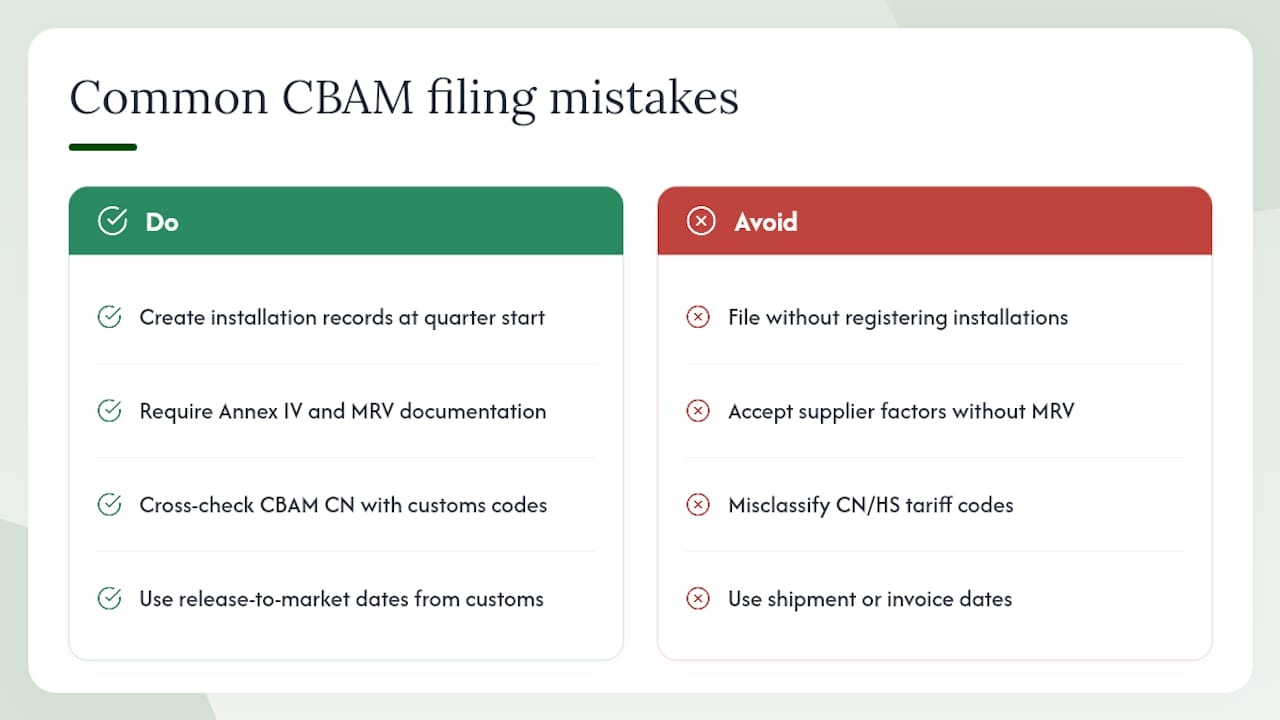
Failing to register installations before filing. The portal requires operator and installation records to exist before you can reference them in a declaration row. Importers who skip this step discover the gap at submission time, not before. Fix: create installation records in the portal at the start of each quarter, not the week of the deadline.
Relying on incomplete supplier data. A supplier who provides an emissions factor without the supporting MRV documentation is giving you a number you cannot defend in an audit. Fix: require the Annex IV template as a condition of the data request, and set a supplier response deadline three weeks before your filing deadline.
CN/HS misclassification. The CBAM scope is defined at the CN code level. A steel product classified under the wrong heading may appear out of scope when it is not, or vice versa. Fix: run a quick cross-check between your CBAM CN codes and your customs tariff classifications at the start of each quarter. Any mismatch needs a customs classification review before the report is filed.
Wrong release-to-market date. CBAM reporting follows the date goods are released to free circulation, not the shipment date or invoice date. A December shipment cleared in January belongs in Q1, not Q4. Fix: pull release dates directly from customs entries, not from shipping documents.
Poor version control on XML files. Submitting an outdated XML version after a last-minute data correction is a common source of post-submission amendments. Fix: implement a file-naming convention that includes a version number and a “FINAL” flag, and require a second reviewer to confirm the correct file before upload.
NCAs can impose penalties for persistent non-compliance, including late filings and materially inaccurate reports. The enforcement framework gives NCAs authority to review reports and escalate to the Commission. Proactive corrections before an NCA review opens are treated more favorably than corrections made under assessment.
Key Takeaways
CBAM quarterly reporting requires every EU importer of regulated goods to file a structured declaration covering quantity, CN code, embedded emissions, and carbon price paid abroad, due within one month of each quarter’s end.
| Point | Details |
|---|---|
| Filing deadline rule | Each quarterly CBAM report is due by the last day of the month following the reporting quarter. |
| Core data elements | Every declaration must include CN code, quantity, country of origin, direct and indirect embedded emissions, and carbon price paid abroad. |
| Supplier data vs. defaults | Use supplier-specific MRV data where available; apply EU default values per CN code only when supplier data is missing or unverifiable. |
| Record retention | Retain all supporting records, XML files, and supplier communications for a minimum of four years. |
| Climastry CarbonOps | Climastry’s CarbonOps platform handles data intake, default-value fallbacks, and XML/XLS export in the format the CBAM Registry requires. |
What compliance teams actually do each quarter
The calendar reality of CBAM quarterly reporting is that the work starts before the quarter ends, not after. A compliance team running a clean process typically sends supplier data requests in the final two weeks of the reporting quarter itself. Waiting until the quarter closes to chase emissions factors from non-EU operators is how teams end up filing with EU defaults when supplier-specific data was actually available.
Week one of the new quarter is reconciliation: customs entries pulled, CN codes verified, quantities confirmed. This is where most errors surface, and catching them here costs an hour. Catching them after submission costs a formal amendment and an entry in the corrections log.
The internal QA cycle in week three is the step most teams underinvest in. Someone other than the person who built the declaration should run the variance checks: does the total embedded emissions figure move in proportion to the quantity change versus last quarter? If steel imports doubled but embedded emissions only grew by 20%, that gap needs an explanation before it becomes an NCA query.
For US-based importers operating in the EU through a subsidiary or indirect customs representative, the coordination layer adds complexity. The non-EU operator (potentially a US manufacturer exporting to the EU) needs to supply Annex IV data to the EU-established importer or their authorised declarant. That communication chain should be formalized in a supplier agreement, not managed by email thread.
Final submission and archiving is the last step, not the last thought. The report ID, submission timestamp, and XML file go into the compliance archive the same day. Quarterly CBAM reporting is a repeating obligation, and the team that treats each quarter as a discrete project with a clean close-out will handle the definitive regime’s financial adjustments without rebuilding their process from scratch.
The UNFCCC long-term climate strategies that underpin CBAM’s policy rationale make clear this mechanism is designed to persist and expand. Building a durable internal process now is not over-engineering — it is the only sensible response to a permanent compliance obligation.
Climastry CarbonOps cuts filing time without adding complexity
Filing a CBAM quarterly report manually across multiple CN codes and suppliers is a data management problem as much as a compliance one. Climastry’s CarbonOps platform is built specifically for that problem: you bring the shipment data, it handles the rest.
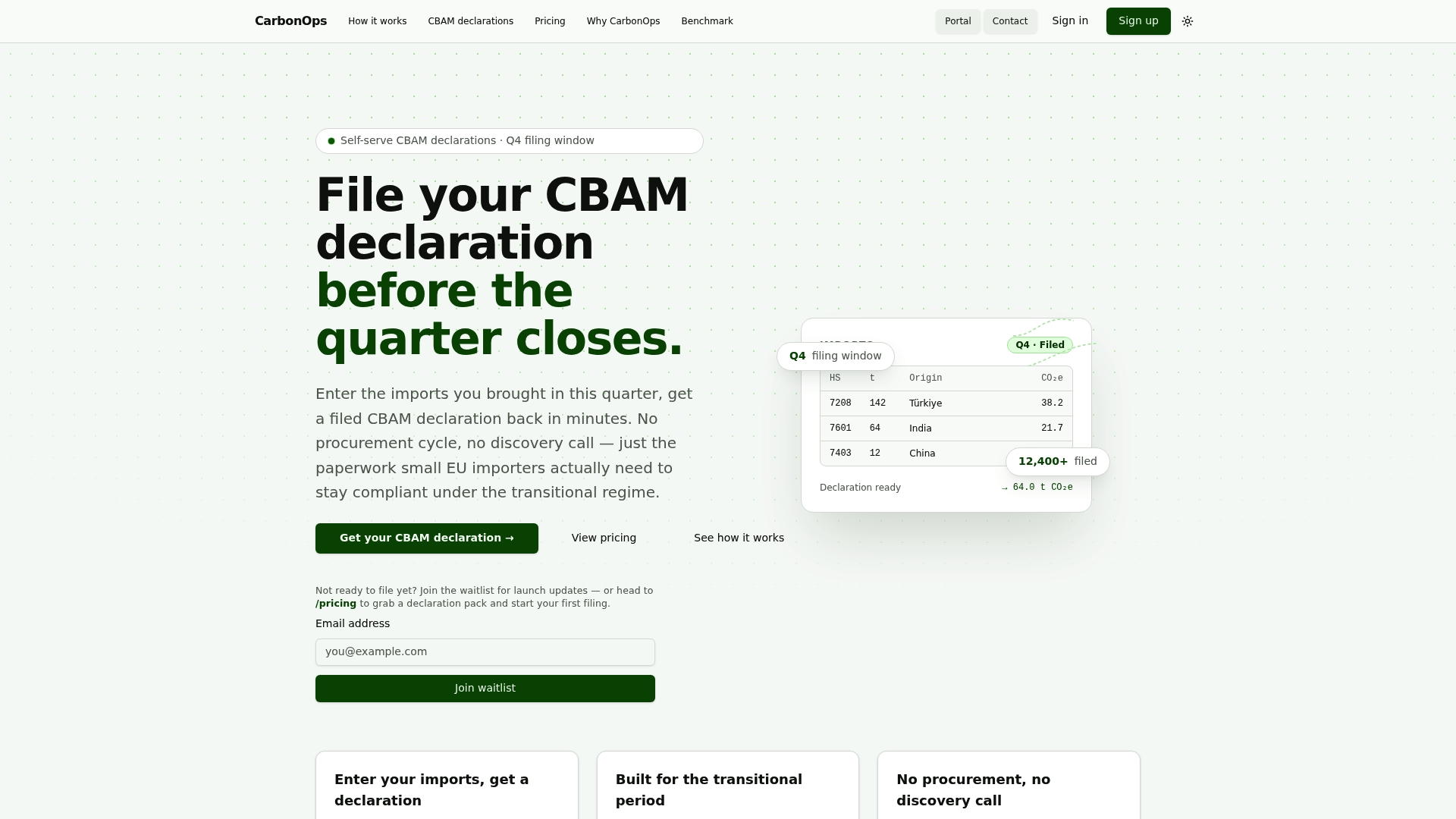
Enter each shipment with its HS code, mass, and country of origin. CarbonOps validates the supplier data, applies EU default values automatically where supplier-specific emissions are missing, and tracks each declaration’s status against the current filing window. When the quarter closes, the completed declaration exports in the exact XML/XLS format the CBAM Declarant Portal requires — no reformatting, no schema debugging.
What that means for your team:
- No platform deployment or onboarding cycle before your first filing
- Automated default-value fallbacks per CN code so declarations are always complete
- Full audit trail and filing history retained for every quarter
- Pay per declaration, with no subscription or long-term commitment
The filing history stays on the platform, so corrections and multi-quarter comparisons are straightforward. Visit climastry.com to file your next quarterly declaration.
Authoritative sources to bookmark for CBAM quarterly reporting
These are the primary references for every procedural and technical question about quarterly CBAM filings:
- Carbon Border Adjustment Mechanism (CBAM) Questions and Answers
- CBAM archive — Taxation and Customs Union - European Commission
- Factsheet: Carbon border adjustment mechanism — GOV.UK
- UNFCCC — long-term strategies
Bookmark the Commission archive specifically — it is updated when new XSD versions are released, and submitting against an outdated schema is one of the most avoidable filing errors.
This article provides general compliance information about CBAM quarterly reporting obligations. It is not legal or regulatory advice. Confirm current rules, deadlines, and technical requirements with the European Commission’s official guidance or a qualified compliance professional.