CBAM Automation: A Practical Guide for EU Importers

CBAM Automation: A Practical Guide for EU Importers
CBAM reporting can be automated end to end, and for most importers, self-serve software is the right starting point. The EU Commission’s CBAM Communication template defines exactly which fields must be populated, which means any tool that mirrors that structure can produce a filing-ready declaration without manual assembly. CarbonOps is the most direct path to that outcome: four steps, no platform deployment, and an audit trail built in from the first shipment.
Before you evaluate any tool, three things need to happen this week:
- Identify your in-scope HS/CN codes. Pull your import records and flag every line that falls under CBAM-covered sectors (steel, aluminum, cement, fertilizers, electricity, hydrogen). Misclassification at this stage cascades through every downstream calculation.
- Assign a data owner. CBAM filings require someone who can chase suppliers, validate emissions figures, and sign off on the declaration. That person needs to exist before you open any software.
- Request supplier emissions data. Send a structured request now. Suppliers in third countries often need weeks to locate installation-level data, and the Commission’s default values carry a cost premium you want to avoid.
The EU CBAM Registry is where declarations are submitted. Bookmark it alongside the CBAM Communication template. Both are the canonical reference points for any automation setup.
Key Takeaways
CBAM automation is viable for most importers today, and the tools that deliver on it share one characteristic: they mirror the EU template structure and produce an auditable evidence chain, not just a number.
| Point | Details |
|---|---|
| Automation is viable now | Self-serve tools can handle CN mapping, emissions calculation, and EU-template export without platform deployment. |
| Evidence chain is mandatory | Every calculated value must link to a source document; a correct number without documentation will not survive verification. |
| Default values carry a cost | Commission defaults are set conservatively; prioritize supplier-specific actual emissions to reduce certificate costs in the definitive phase. |
| Standardized schemas scale | A shared data template for supplier onboarding reduces integration work and improves verifier acceptance rates. |
| CarbonOps as a starting point | CarbonOps covers the full four-step workflow with pay-per-declaration pricing and no deployment overhead. |
Table of Contents
- What does CBAM actually require importers to report?
- The core automation capabilities every CBAM tool must provide
- How do you evaluate CBAM compliance software?
- How does CBAM automation work, step by step?
- What does the EU Registry expect from your filing?
- How do you collect installation-level supplier emissions data at scale?
- What are the most common CBAM compliance mistakes?
- Why standardized data models are the real unlock for CBAM automation
- CarbonOps turns your import list into a filing-ready CBAM declaration
- Sources
What does CBAM actually require importers to report?
CBAM is not a carbon tax on the import itself. It is a requirement to account for the embedded emissions in specific goods and, eventually, to surrender certificates proportional to those emissions. The reporting obligation is more granular than most importers expect.
Core reporting items every filing must address:
- Product-level embedded emissions calculated at the installation level, not the country or sector average
- CN/HS code mapping to the correct CBAM sector (the six covered sectors each have specific CN codes)
- Installation tie-ins where applicable, meaning the specific facility that produced the goods, not just the exporting country
- Direct and indirect emissions depending on the sector (indirect emissions from electricity apply to aluminum and some other goods)
The EU’s consolidated regulation (Regulation 32024R3210) defines registry components, portal roles, and the interoperability requirements that govern how declarants, operators, and verifiers interact with the system. Every automation tool you evaluate must produce outputs that satisfy these structural requirements.
Filing cadence and phases:
The transitional phase ran through the end of 2025, requiring quarterly reports but no certificate surrender. The definitive phase, which began January 1, 2026, requires annual declarations and actual certificate purchases. The annual declaration covers the prior calendar year and is due by May 31. Quarterly transitional reports are no longer required, but the data habits you built during that phase — installation-level emissions, supplier documentation, CN code mapping — carry directly into the definitive regime.
Verification and recordkeeping are not optional extras. The Commission’s materials make clear that third-party verifiers will review declarations, and importers must retain supporting documentation that links each calculated emissions figure to its source. Software that does not produce an auditable evidence chain creates a compliance gap that no spreadsheet workaround can close.
| Requirement | Transitional Phase | Definitive Phase |
|---|---|---|
| Filing frequency | Quarterly | Annual (by May 31) |
| Certificate surrender | Not required | Required |
| Emissions basis | Actual or default values | Actual or default values |
| Verification | Encouraged | Mandatory |
| Registry submission | CBAM Declarants Portal | CBAM Declarants Portal |
The core automation capabilities every CBAM tool must provide
A tool that handles data entry but not evidence linking is not a CBAM automation tool. It is a spreadsheet with a better interface. The features below map directly to the regulatory requirements above.
Supplier data intake and structured templates
The tool must accept installation-level data: production tonnage, energy and fuel volumes, material transformation routes (MTRs), and utility bills where applicable. Unstructured email attachments are not a workflow. Look for a structured intake form or upload template that validates fields on entry.
Embedded emissions calculation engine
The calculation must map to the EU template fields. The key fields are A_InstData (installation identification), B_EmInst (installation-level emissions), D_Processes (process-level breakdown), E_PurchPrec (purchased precursors), and Summary_Communication (the declaration summary). A tool that calculates a single aggregate number without populating these fields cannot produce a compliant filing.
Default-value management
The Commission publishes default values per CN code and country of origin. A compliant tool must apply these automatically when supplier-specific data is missing, and it must version those defaults as the Commission updates them. Using an outdated default is a filing error, not a conservative estimate.
Verification and evidence-chain features
Every calculated value needs a traceable link to its source document. Auditors and third-party verifiers need read-only access to that chain without receiving a raw data export. Look for immutable document links, a verifier access portal, and an export format compatible with O3CI expectations.
Interoperability and integration
The Eclipse Tractus-X community’s CBAM kit guidance is explicit: standardized data models are a prerequisite for scaling supplier integrations. A tool locked into a proprietary supplier portal with no data export creates a dependency that grows more expensive with every new supplier relationship. API access, Excel/XML export, and Catena-X-compatible data models are the baseline.
Operational capabilities
Multi-quarter filing support, user roles and access control, and data retention for regulator-required periods round out the feature set. These are not differentiators. They are table stakes.
| Feature Category | What to Verify |
|---|---|
| Supplier intake | Structured templates, field validation, installation-level fields |
| Calculation engine | Maps to EU template fields (A_InstData, B_EmInst, etc.) |
| Default values | Commission defaults applied automatically, versioned on update |
| Evidence chain | Immutable source links, verifier read-only access |
| Interoperability | API, Excel/XML, Catena-X or standard data model support |
| Filing operations | Multi-quarter support, user roles, retention/archival |
How do you evaluate CBAM compliance software?
The evaluation criteria that matter most are not the ones vendors lead with. Here is what to test before you commit.
Operational criteria
Ask how long it takes from shipment data entry to a submission-ready declaration. Ask how many CN codes the tool supports and whether that list is maintained as the Commission updates sector coverage. Ask what verification export formats the tool produces and whether those formats are compatible with O3CI.
Technical criteria
Request a sample API call and a sample XML export. If the vendor cannot produce these in a demo, the integration story is aspirational. Confirm the data model is documented and exportable, not locked inside the platform.
Compliance criteria
The audit trail must be complete and immutable. Change logs should record who modified what and when. Data retention must meet the regulator-required period. Verifier access must be read-only and scoped to the relevant declaration, not the entire account.
Vendor governance questions
Ask who is responsible for updating the tool when the Commission revises the CBAM Communication template. Ask how quickly those updates are deployed. A vendor who cannot answer this question concretely is telling you that your compliance depends on their internal prioritization.
Red flags to walk away from:
- No evidence-chain linking between calculated values and source documents
- A proprietary closed supplier portal with no data export option
- Inability to export the official EU template format
- No versioning on Commission default values
- Verifier access that requires sharing full account credentials
Pro Tip: Run a parallel test: take one real shipment from your last quarter, enter it manually in the vendor’s trial, and compare the output against what you filed. If the numbers diverge and the vendor cannot explain why, that is your answer.
How does CBAM automation work, step by step?
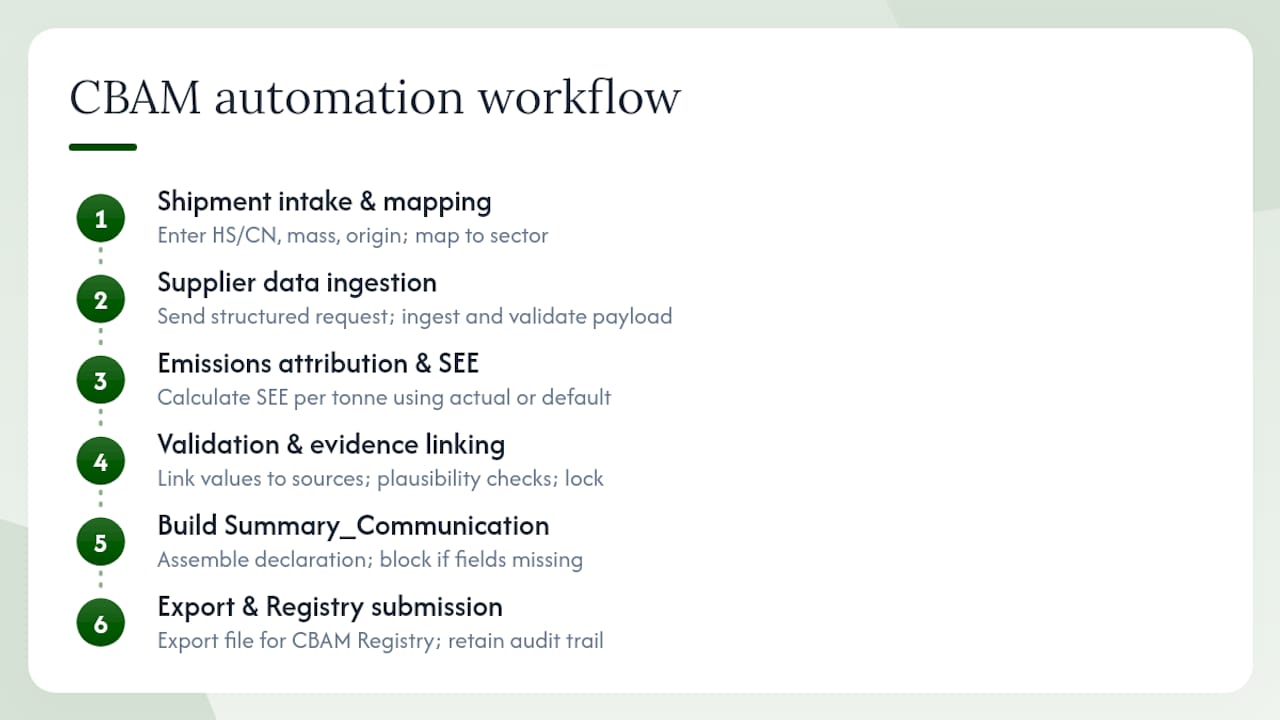
A repeatable workflow has six stages. Any tool you evaluate should be able to demonstrate all six in a live session.
Step 1: Shipment intake and CN/HS mapping
Enter each imported shipment with its HS/CN code, mass, and country of origin. The tool maps each line to its CBAM sector and flags lines that are out of scope. This is where misclassification risk is highest. A good tool validates the CN code against the current CBAM-covered list and surfaces any ambiguous mappings for human review.
Step 2: Supplier data request and ingestion
The tool generates a structured data request for each in-scope supplier. The supplier provides installation ID, production tonnage, energy and fuel volumes, and MTR documentation. The tool ingests this payload and validates it against expected ranges. Missing fields trigger an automated follow-up, not a manual email chain.
Step 3: Emissions attribution and SEE calculation
Specific Embedded Emissions (SEE) are calculated per tonne of goods, using either supplier-provided actual values or Commission default values where actual data is unavailable. The calculation engine populates the relevant EU template fields automatically.
Step 4: Validation and evidence linking
Each calculated value is linked to its source document. The tool runs plausibility checks: does the SEE figure fall within a reasonable range for this CN code and country? Outliers are flagged for review. The evidence chain is locked at this stage.
Step 5: Build the Summary_Communication
The tool assembles the Summary_Communication from the validated field-level data. This is the declaration summary the Registry expects. Any field that is missing or out of range blocks submission until resolved.
Step 6: Export and submit via the Registry
The completed declaration is exported in the format the EU CBAM Registry expects. For the definitive phase, this means a submission through the CBAM Declarants Portal. The export is retained in the tool’s filing history for the audit trail.
The O3CI module of the CBAM Registry allows non-EU installation operators to upload their emissions data directly, so declarants can pull it without repeated supplier submissions. A tool that supports O3CI-compatible exports removes the single biggest friction point in the supplier data loop.
Pro Tip: Reduce supplier friction by sending a minimal payload request first: installation ID, production tonnage, and primary energy source. Once the supplier responds, follow up for the full MTR documentation. A two-stage request gets faster responses than a single comprehensive form.
What does the EU Registry expect from your filing?
The CBAM Registry is not a single portal. It has distinct modules serving different actors, and your software must produce outputs that satisfy each relevant module’s requirements.
Registry modules and their roles:
- Authorisation Management Module (AMM): Manages declarant authorizations and EORI-linked access. Importers must be authorized before they can submit declarations.
- O3CI (Operator and Installation Data): Allows non-EU operators to upload installation and emissions data. Declarants search for their suppliers’ installations and link them to declarations, avoiding repeated data requests.
- CBAM Declarants Portal: Where authorized importers submit their annual declarations and manage certificate purchases in the definitive phase.
Essential fields the EU template requires:
Every declaration must populate A_InstData (installation identification and location), B_EmInst (total installation-level emissions), D_Processes (process-level emissions breakdown), E_PurchPrec (emissions from purchased precursors), and Summary_Communication (the declaration-level summary). Software that cannot map its internal data model to these field names is not producing a compliant output.
Interoperability requirements under Regulation 32024R3210 include compatibility with the EU Single Window Environment and UUM&DS (Uniform User Management and Digital Signature). These are not optional integrations. They are the authentication and submission infrastructure the Registry runs on.
Recordkeeping and access management requirements mean that software must retain declaration data and supporting documents for the period specified by the regulation. Access logs must show who viewed or modified each record. Verifiers need scoped read-only access without requiring full account credentials.
The Commission updates the Registry and its technical specifications as the definitive phase matures. A tool that is not actively maintained against those updates will produce stale exports.
How do you collect installation-level supplier emissions data at scale?
Supplier data collection is where most CBAM automation projects stall. The calculation engine is the easy part. Getting clean, installation-level data from dozens of suppliers in third countries is the hard part.
The minimal supplier payload
Start with the minimum required to calculate SEE: installation ID, production tonnage for the relevant period, primary energy source and volume, and EORI number where available. MTR documentation and utility bills can follow in a second request. Asking for everything at once produces slow, incomplete responses.
A tiered onboarding approach:
- Send a one-page data request with the four minimal fields and a deadline.
- Follow up with a structured template (Excel or web form) that validates entries on input.
- For suppliers with verified actual emissions, request supporting documentation: utility bills, production logs, third-party verification reports.
- For suppliers who cannot provide actual data, apply Commission default values and flag those lines for priority outreach in the next cycle.
Data validation at intake
Automated plausibility checks catch the most common errors before they reach the calculation engine. Flag any SEE figure that falls more than two standard deviations outside the range for that CN code and country. Flag any installation ID that does not match a known O3CI record. Flag any production tonnage that is inconsistent with the declared import mass.
Evidence retention
Every source document must be stored with a link to the specific data point it supports. A utility bill that supports a fuel volume figure needs to be retrievable by declaration line, not just by supplier name. Auditors do not search; they follow links.
- Store documents in a named, structured folder hierarchy tied to declaration ID and installation ID.
- Retain for the full regulator-required period from the date of the declaration.
- Log every access to source documents, including read-only verifier access.
What are the most common CBAM compliance mistakes?
Most filing errors trace back to three root causes: wrong CN code, missing installation-level evidence, and over-reliance on default values without a plan to replace them.
Common pitfalls:
- Mismapping HS/CN codes. A single digit error in a CN code can move a good out of CBAM scope entirely or into the wrong sector with different calculation rules. Validate every code against the current CBAM-covered CN list before calculating emissions.
- Relying on defaults without a replacement strategy. Commission default values are designed to be conservative, meaning they are set high enough to discourage their use. Importers who rely on defaults for every line face higher certificate costs in the definitive phase. Automation helps here by flagging default-value lines and generating supplier outreach for the next cycle.
- Missing installation-level evidence. A declaration that shows a correct SEE figure but cannot link it to a source document will not survive a verification review. The evidence chain is not a nice-to-have; it is the filing.
- Treating the transitional phase as a dry run. The data habits and supplier relationships built during quarterly transitional reporting are the foundation of the definitive phase. Importers who treated those reports as low-stakes practice are now rebuilding supplier data pipelines under annual deadline pressure.
Pre-submission compliance checklist:
- Every in-scope CN code validated against the current CBAM-covered list
- Every declaration line resolved to either actual or default emissions (no blanks)
- Every source document linked to its corresponding data point
- Summary_Communication fields fully populated and within expected ranges
- Verifier access configured and tested before the submission deadline
- Filing history retained and accessible for the audit period
Automation handles the first four items reliably. The fifth and sixth require a human to set up and verify. That is the right division of labor.
Why standardized data models are the real unlock for CBAM automation
Most of the debate around CBAM automation focuses on the calculation engine. The harder problem is supplier integration, and the answer there is not a better API. It is a shared schema.
When every supplier sends data in a different format, every integration is a custom project. You end up maintaining a patchwork of Excel parsers, email templates, and manual validation steps that grows with your supplier count. The Eclipse Tractus-X community’s CBAM kit guidance makes this point directly: standardized data models are a prerequisite for scaling, not an optimization for later.
The practical implication is that a schema-first supplier onboarding approach pays off faster than it looks. If you define the data structure your tool expects and give every supplier the same structured template, you get consistent inputs that validate automatically. The first few suppliers take longer to onboard. Every subsequent one takes less time, because the template is already built and the validation rules are already written.
Standardization also improves verifier outcomes. A verifier reviewing a declaration where every data point links to a consistently formatted source document can complete their review faster and with fewer clarification requests. That is not a minor efficiency. Verifier time is a real cost, and declarations that require multiple rounds of clarification delay certificate surrender and create regulatory exposure.
The Catena-X conventions are worth understanding even if your supply chain does not currently use them. They represent the direction the industry is moving, and tools built around those conventions will require less rework as the definitive phase matures and verification expectations tighten.
CarbonOps turns your import list into a filing-ready CBAM declaration
Filing a CBAM declaration without a six-month platform deployment is possible. CarbonOps is built specifically for that: you bring your shipment data, and the tool handles the rest, from HS/CN code mapping through EU-template export, with no procurement cycle and no sensor rollout.
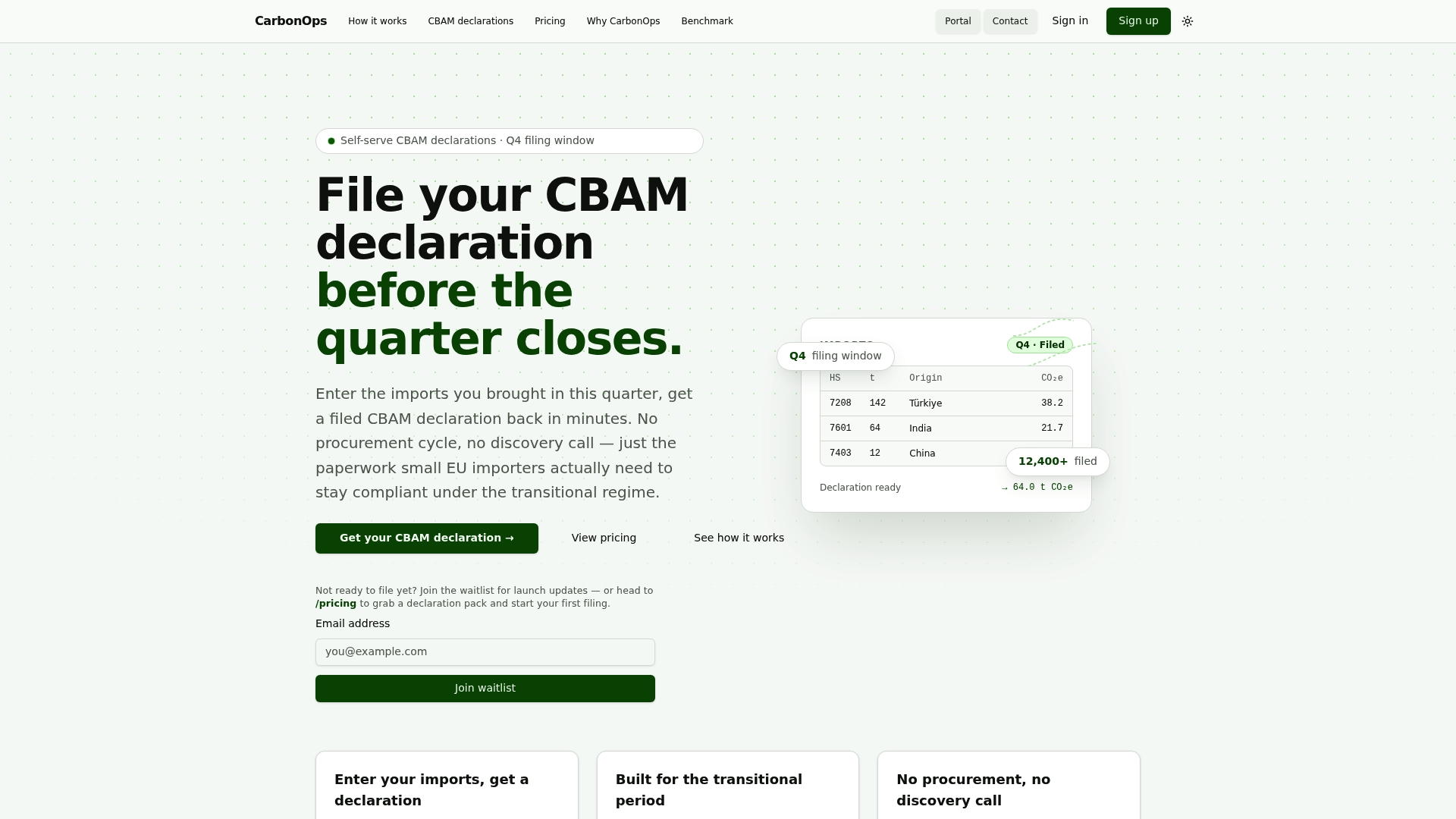
The four-step workflow covers every compliance requirement discussed in this guide. Enter each shipment with its CN code, mass, and country of origin. CarbonOps maps each line to its CBAM sector and surfaces any gaps in emissions data. Where supplier-specific figures are available, they are applied directly. Where they are missing, the Commission’s published default values fill in automatically, so every line resolves to a complete, reviewable figure. The final output is exported in the format the EU CBAM Registry expects, retained in your filing history, and ready for a verifier to review.
Pricing is pay-per-declaration: a single filing, a 5-pack, or a 15-pack, with no subscription and no long-term commitment. For compliance teams managing a defined number of filings per year, that structure is more predictable than a platform license. Start your first declaration at CarbonOps and have a filing-ready output before the end of the week.
Sources
Official EU pages and implementation resources for CBAM compliance:
- CBAM communication and news - Taxation and Customs Union
- Consolidated TEXT: 32024R3210 — EN — 01.01.2026
This article is general information, not a substitute for advice from a qualified lawyer. Consult a qualified legal professional about your own circumstances before acting on anything here.